 |
| Training Entry |
| |
| Entry level users are introduced to the basics of workflow and processes on a generic level. This includes developing an understanding of the flow of work; were it comes from; and where it goes as well as the building blocks of Processes and Queues and how this works in-conjunction with a Workflow System. An introduction to Log and Scan Workstation is included in this section. |
| |
- Workflow and Processes Overview
|
| The Workflow and Process Overview training manual takes a high level, generic look at the building blocks that make up Workflow. Using a generic process such as a motor manufacturing process flow line along with more business specific processes, concepts such as queues, outcomes and processes are explained. |
| |
|
| The Log Workstation software is used to index scanned documents. The logging process includes identifying what type of document it is as well as who the document belongs to i.e. client details. Once indexed the image is saved to an image holding system e.g. FileNet, SBI or a database. |
| |
|
| The Scan Workstation software is used for scanning documents to a document management system. The images stored can then be indexed using the Log Workstation software. |
| |
| Training Intermediary |
| |
| Before anyone can start on their quest to understanding the intricacies of the Mindkey Workflow system, they have to have a basic understanding of what a process is and how that forms the basis of Workflow. The training material developed by Mindkey was geared at achieving just that in a generic, fun filled yet affective training session. During the Process Overview training session, trainees are taken through the building blocks of a process. Terms such as queues, outcomes, process flow etc are explained in detail. |
| |
| Trainees are taken on a guided tour through the Mindkey Workflow system. Functionality such as spawning work items, adding additional documents to work items, working with worksheets etc are explained. |
| |
|
| This combines and applies all the knowledge gained during the Workflow and Process Overview training as trainees are shown how their business process fits into the bigger picture. |
| |
|
| The Contact Centre front end system was initially developed for STANLIB. Since then companies such as Liberty, GIPF (Windhoek – Namibia) and Old Mutual (Nairobi – Kenya) have requested implementation of this system to assist them with their client services departments. Trainees are shown just how simple and affective the Contact Centre Interface is to use. |
| |
| Training Admin |
| |
| This training session forms the last part of a three part training session designed to equip a super user (system administrators) with the knowledge and understanding of how to effectively setup and maintain the Mindkey Workflow system and is made up of the following 3 objectives: |
| |
|
| Trainees are shown how to use the User Maintenance administrative tool which is used to either edit current system user details or to create new users. |
| |
|
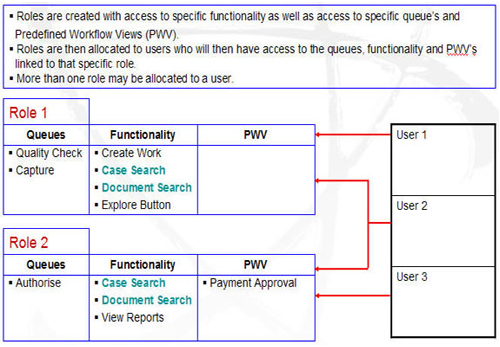
| Trainees are shown how to create Roles using the Roles Maintenance administrative tool, linking these to system users thereby granting them access to certain processes, queues and Workflow functionality. |
| |
 |
| |
|
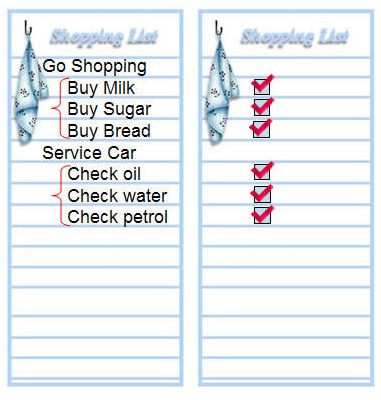
| Trainees are shown how to setup and maintain the Task List worksheet. This worksheet functions much the same as a tick list and is setup according to specific business requirements. |
| |
 |